Note Teacher download for android 13 (Tiramisu)
APK file Note Teacher 1.7.3 compatible with Android 13How to install APK / APKS / OBB file on Android
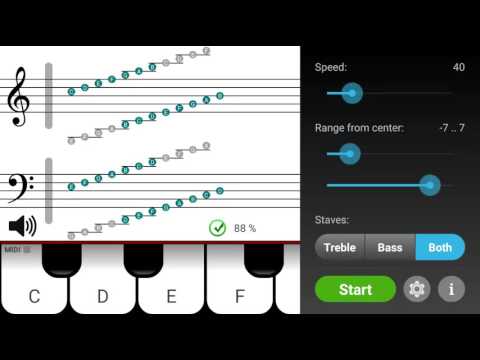

Discover a fun, engaging, and highly efficient way to master sight-reading and musical note names.
🎵 Interactive Learning Experience
Watch as notes glide across the grand staff and press the correct piano key to catch them. Track your response times and focus on improving weaker notes with our adaptive learning system.
⚙️ Customizable Practice Sessions
Adjust the speed of the notes and select the range of notes you want to practice. Explore different key signatures to hone your skills with sharps and flats.
🎼 Treble and Bass Staff
Enjoy free practice with notes on the treble staff. Unlock the bass staff with a convenient in-app purchase for a comprehensive learning experience.
🔊 Sound Control
Easily toggle sound on or off by tapping the speaker icon.
🎹 MIDI Device Support
Connect compatible MIDI devices to you Android device for an enhanced practice session. A USB OTG cable may be required for connectivity. Note that MIDI functionality may vary depending on the device manufacturer.
Download now and start your musical journey today!
- LicenseFree
- File nameNote Teacher
- File Version1.7.3
- Package namecom.swampsend.noteteacher
- Size5.12 MB
- UploadedAugust 30, 2025
- Android5.0 or later
- CategoryEducation
- DeveloperMapsiTech Oy
- Developer emailmaastokartat@mapsitech.fi
- md5 hash5f3a64e0dfacdf85c0aa4efea1ba09a4
- Architecture-
- Permissionsshow (2)